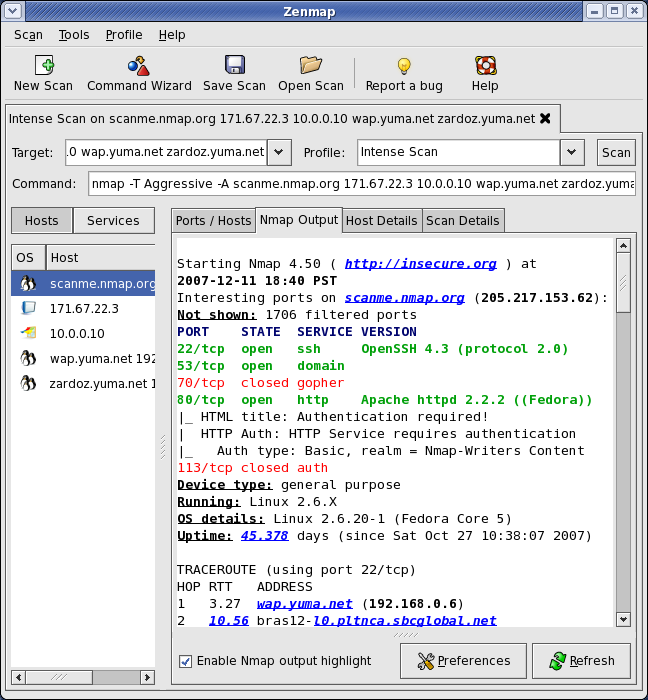
Alot of new features if you have never used nmap before I suggest you check it out here is the download link.
http://nmap.org/download.htmlEnjoy!
Alot of new features if you have never used nmap before I suggest you check it out here is the download link.
http://nmap.org/download.htmlEnjoy!

MOUNTAIN VIEW, Calif.--One of Firefox's initial claims to fame is the fact that the browser can be extended with a multitude of plug-ins, and even though Microsoft caught up with Internet Explorer, Firefox still has an extension edge over Google's new Chrome Web browser.For now.
"We don't have that in the beta today, but we definitely plan an extension API," or application programming interface, Sundar Pichai, a Google vice president of product management, said at the Chrome launch event here Tuesday. "It is one of the things we will get to next."
Firefox extensions cover a wide swath of abilities, from synchronizing bookmarks to debugging Web site performance to showing detailed exposure data for online photographs. The extensibility has attracted scads of programmers, too, which is strategically important for most computing efforts.
Google, no doubt, envies the Firefox extension assets. But it's hard to imagine the company mustering much enthusiasm for one of the most popular Firefox extensions, AdBlock Plus, which suppresses many advertisements.
Google has a strong focus on giving Web users a good experience--indeed, it said its studies show that users find the text ads placed next to search results an overall improvement. But Google's business depends on advertising, and its $3.1 billion DoubleClick acquisition is geared to give the company strength in just the sort of online display advertisements that AdBlock is designed to counteract.
Extensions shouldn't be confused with a related technology, plug-ins, which includes software such as Sun Microsystems' Java, Microsoft's Silverlight, and Adobe Systems' Flash. Existing plug-ins work in Chrome, Pichai said.
Article: http://news.cnet.com/8301-1001_3-10031764-92.html


Then ask a convenient window size and position on the screen - Chrome remembers the size of the window when restart.
In establishing dialogue label application displays the name and brief description of the application. Give them, as well as links to the icons, which will be used to create desktop versions of icons, you can say:
Then ask a convenient window size and position on the screen - Chrome remembers the size of the window when restart.
In establishing dialogue label application displays the name and brief description of the application. Give them, as well as links to the icons, which will be used to create desktop versions of icons, you can say:
 Flash is being slow (or not working at all)!
Try downloading and reinstalling flash on your computer (make sure ALL browsers are closed). (link)
This doesn't work for all reported flash issues. If you still have problems, or if flash gives you an error on reinstall, try uninstalling flash and reinstalling. Also try rebooting after or in between those steps.
Chrome won't start / Chrome won't view pages / Chrome won't install!
Chrome is using most or all of my CPU!
I use a proxy to connect to the Internet - how do I set that up with Chrome?
I don't have personal experience with this one, so anyone who has a definitive answer, please let me know. The advice I've seen thus far is to edit your system proxy settings. It seems likely that Chrome would use any defaults set on the system. If this doesn't work, another person suggested importing settings from IE (assuming you have IE working with your proxy).
I use X,Y, and Z plugins and A,B, and C extensions for Operafox Safplorer. Can I use them in Chrome?
Sadly, unless you're talking about Flash and Adobe Acrobat Reader, you're probably out of luck for now. I have trouble believing that a project like this won't soon incorporate features supporting extensions and everything else you'd expect from a browser of the future.
HELP! FACEBOOK IS BROKEN!
Google did say that any sites requiring a login could potentially be buggy, as their bots can't exhaustively test sites requiring authentication. Give it some time.
Chrome won't import my Firefox 3 bookmarks!
This issue is still somewhat of a mystery, but we know that it works for some people and not for others. The current correlations we're considering is that it may not work if Firefox is not installed in the default location, and it may be more likely to work if you have Firefox open while installing Chrome. These are still quite speculative, but I'll try to do some experementation tonight to see if I can get anywhere. The full thread for this issue is here.
A page with Java content isn't working for me
Try downloading and installing the latest JRE.
My touchpad/trackpad scrolling doesn't work (or is unusably fast)
You can try changing your settings in the mouse control panel (specifically in the section added by your drivers), but this seems to be of limited use, and will possibly cause scrolling to be useless everywhere else in the system even if you get it working in Chrome. We're probably going to have to wait for Google to come up with a solution to this. [This problem has been reported for some Dell, HP and Toshiba laptops, and likely affects others as well.]
All YouTube videos give the error: "We're sorry, this video is no longer avaible!".
Fix if using Kaspersky (avoiding disabling web protection) :
- In the "web anti-virus" tab under "protection" main page, click "configure", then "customize"
- Replace the "buffering scan" traffic scan method with the "streaming scan" method, by checking the appropriate box, then OK.
- Close chrome if open, then retry reading a youtube video with chrome.
Now you know you have alot of money when your sending a f#cking satellite up in space for a website.
The GeoEye satellite
that Google will use to provide mapping imagery at 50-centimeter resolution successfully blasted into space today. So don't leave your underwear lying all over your lawn.
Andy Plesser of Beet.TV put together a cool video animation
GeoEye-1 will orbit 423 miles above Earth, but it will be able to gather imagery with details the size of 41 centimeters... Google, though, is permitted to use data only with a resolution of 50cm because of the terms of GeoEye's license with the U.S. government.
Each day, the satellite will be able to gather a high-resolution "pan-sharpened
http://www.alleyinsider.com/2008/9/google-satellite-now-watching-you-from-423-miles-up
Firefox is getting nervous so here comes the bad mouth:
September 5, 2008 (Computerworld) Mozilla Corp. answered claims thatGoogle Inc.'s Chrome browser outperforms Firefox with benchmark results of its own that showed the upcoming Firefox 3.1 is faster at executing JavaScript.
According to tests run by Brendan Eich, Mozilla's chief technology officer and the creator of JavaScript, Firefox's new TraceMonkeyinterpreter is up to 28% faster than V8, the name Google gave to the interpreter used by Chrome.
Now I understand Google comes out with a new fast browser and its just in its beta stage, people are starting to convert from the FireFox colt to the Chrome. I have personally changed browsers but sense the Chrome browser doesn't handle flash games/videos that we'll I use FireFox to watch youtube videos and play games.
I smell a browser war to come and also the release of Internet Explore 8 beta 1 has just been released but who cares IE has always failed.


